
Spring 2016 -- Peter Brooks
| Extra credit projects |
I've put two new slots onto the homework server for those of you who want to do extra credit (EC) projects: one for the proposal and one for the project itself. EC proposals (a talk with me)are due (latest) on Mon. The procedure is:
|
| Here is the demo of handling a conversation | HiddenDocs |
| Projects due Sun. 6/5 midnight | Also, I will ask you to show progress on your projects in class on Tue, 5/31. Individual extra credit project proposals can be negotiated with me after your project has been finished and handed in. |
| Some cool previous intro-2 projects | |
| External data useful for projects | Here is the NYC Open Data site. Here is the Open Weather Map site (though I'm having some trouble with it) |
| My Tiz answers are here | |
| Project proposal due by Fri. 5/20 midnight (forgot to post a slot for Period 9) | The project needs to be interactive, with at least one front-end web page soliciting user responses, and at least a back-end Python program doing its wonderful thing. Beyond that minimal description, a world of possibilities beckons. Write the proposal into the Comments-to-Teacher or upload a file (.doc, .docx, .pdf, .txt). Tell me whether you're working with someone else (and who?). |
| Homework for Sun. 5/15 | Here are some Query/Answer interactions to do with the SAT data. |
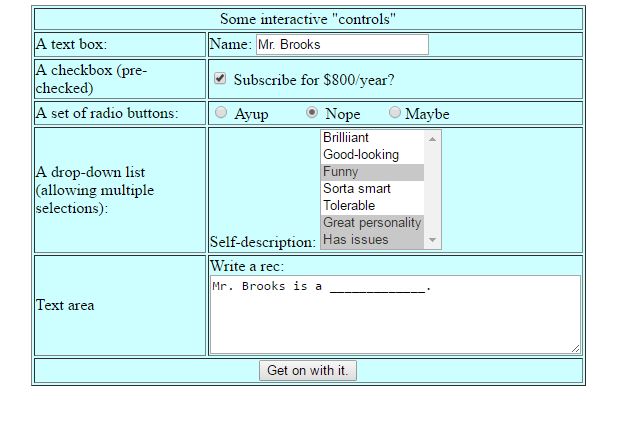
| Interaction on the web | Here's my Guide for HTML Interaction: Here's a picture of a sample web page. Try to duplicate it. When you do, use the following form-tag: <form method="get" action="http://homer.stuy.edu/~pbrooks/allcgi.py"> For me, pressing the button gave me back the following output: Variables and values sent:like_rad=Nope Here is the python program allcgi.py. |
| Approximate requests |
Here are a couple of class listings of students and their (random) ratings for period8.csv and period9.csv Download the one for your period. |
| Dictionaries Homework due Sat, 4/30/16 |
This is some documentation on dictionaries. But it has an introduction to dictionary
concepts. Here is another Python shell session demonstrating dictionary usage. Read now, and look back at it later when exercises will
appear. Exercises are here. My
exercise answers are here. |
| Using raw_input() and print formatting |
Here is my answer to the class exercise about building a committee |
| Je suis à la maison avec un rhume. But I should be back on Tues. | 1. Please work on the homework, now due Wed night instead of
Tues. 2. String test grades are up on the homework server. Most of you got a grade boost as a result of your digital version from last Monday. I'll be handing the tests back tomorrow. |
| Homework due Wed, 4/13 | Here it is, but
check back, because I'll be adding a few more problems. Here are the answers. |
| Text files | A large list of English words (dictall.txt). The original U.S. Bill of Rights. and name_grade.csv |
| From the test on Fri. and the makeup on Mon... | Here are the problems, with a variety of answers to each. |
| List exercises, due Mon, 4/4 | List exercises are here. Answers are here. |
| Advice about APCS | Here is some advice about applying to enroll in APCS from Haley Zeng and Mr . Holmes |
| Additional string exercises, due Sun 3/27, midnight | |
| Still home. Still expecting to be in tomorrow. | I've coughed up some string
exercises you should do in class. Here are my answers. |
| At home, reveling in sickness, but will probably be in tomorrow (Tues), and I've extended the homework deadline (below) | Spend the period doing the string homework or CodingBat problems. You should be able to do all CodingBat problems that do not involve lists -- that means all or most of every section except List-1 and List-2 and make sure you sign in. And help your neighbors... |
| String exercises, due Tues, 3/22, midnight | These string
exercises use your knowledge of strings and looping... Here are my answers. |
| Iteration exercises, due Sun, 3/13, midnight | My answers are here. Remember that there are many correct answers to most problems. |
| Python cribsheet | Here is also a wonderful single-page guide to many of the most useful Python functions/methods. |
| Homepage competition results are in! | |
| Python! |
Download Python version 2.7.11 from python.org and install (if you want to use the newer, version 3.x, you can, but a small number of Python constructs will be somewhat different from what we use in class (but not a big deal)). You'll be using the IDLE program to work with Python (unless you have a replacement for it, like IPython), and for Windows users, you'll want to execute the program idle.bat found in the subdirectory python2.7/Lib/idlelib. Try it. |
| Personal Homepages (and competition). Your vote is due by Sun, 2/28, midnight, to be tallied next Monday. | Here
is the listing. Please view all of the homepages, not only
the ones in the competitive category, and then submit to the
homework server, in the Comments-to-Teacher, your vote for first
place person and second place person (vote only for folks in your
class). BTW, if you don't see a link to your personal page on the listings page above, there was probably a problem with the link that you submitted (you were supposed to submit a link in the Comments-to-Teacher). If so, fix it (and TEST IT by looking at the View Homework tab) and then write me an email message that you've done so. |
| Wed. 2/24: I'm out. | So, I'm delaying the quiz
until Monday. For it, you should be familiar with: how to make
and publish web pages, HTML syntax and all of the tags/attributes we
covered, basic familiarity with CSS, as much of the internet
plumbing that we covered.
Here's a little example of CSS and Javascript. |
| Personal home page (potential competition), due Tues, 2/23, midnight | Create a personal
homepage and publish it (by putting it into your public_html)
directory on Marge, and placing a link to it on the homework
server. You also have a choice as to whether you want to enter
it into the class competition or not (no penalty if not) -- so
indicate Yes (competition) or No (not in competition)
in the Comments-to-Teacher part of the homework slot. Be sure
to check whether your link works by going to View Homework and
clicking on your submitted link.
Here's a link to last year's personal homepages. |
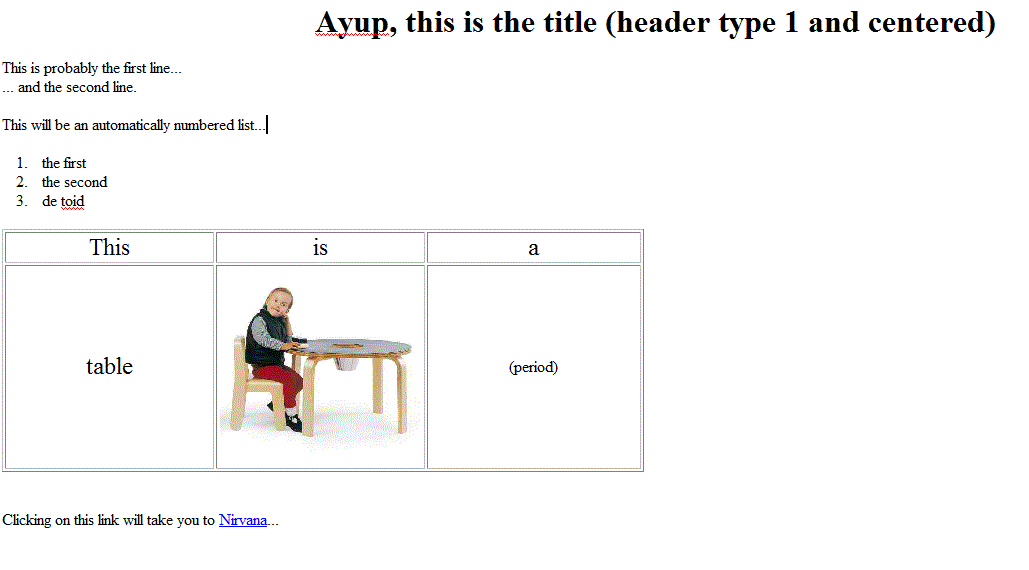
| Create a simple web page. Due: Wed. 2/10 (2./11 for period 8) midnight | You should create an HTML page on your home computer that looks somewhat like this. It has to have a table, at least an embedded picture, and at least one link. Upload this html page to your public_html directory, and put a link to it in the Comments-to-Teacher box of the homework slot. Instructions on how to do this are here: Uploading to Stuy. After you have done so, go back to the View Homework menu option, and try clicking on the link you've submitted to me. If it works, you're fine. If not, fix it -- I do not want to click on your link and see nothing, or some error message. |
| HTML guide results from y'all | |
| Find a great guide to HTML. Due: Sat.
2/6 midnight |
Search the internet (make sure to visit every
single page) to find a guide to HTML tags and usage.
In the homework slot for this task, write a recommendation
for the site that you found, and include a link to the site
itself. I will publish to my classes some of the
comments and sites that some of you have recommended.
Write your comments into the Comments-to-Teacher portion of
the homework server slot for this homework. And
write the text for the appropriate HTML link command
into the comments. For instance, if you thought (for some bizarre reason) that the web page at "http://bert.stuy/edu/pbrooks/spring2016" was a great guide to HTML and life in general, then you might type the following into the Comments-to-Teacher: I found the information and guidance on the page: <a href="http://bert.stuy.edu/pbrooks/spring2016">True brilliance</a> truly, well, something.Check your work: Then, after submitting this to the homework server, check it by going to the "View Homework" tab and seeing what I would see, and click on the link that you placed there, and make sure that it leads you to the site you wanted. Always, (always, (always)) check your work. It's easy, fast, and leads you away from later embarrassment. |
| First task: fill out your Profile on the Homework server. |
|
| Help from Mr. Brooks | Feel free to come and see me during periods 2, 3, 7 or 10 in room 301 or, by appointment beforehand, just after school also in room 301. |
| Sending email to Mr. Brooks: 1. Use the correct address in the right-hand box 2. You MUST include your name in the subject line or body of the message, otherwise I won't know who it's from. |
Period 8: intro-s16-8@micromind.com
Period 9: intro-s16-9@micromind.com |
| Stuyvesant bell schedule | |
| Homework/grade server |